Showing posts with label remove ransomware. Show all posts

Monday, December 28, 2015

Completely Remove .ENCRYPED Ransomware & Restore .ENCRYPED Files

How to free from the virus which generates .ENCRYPED files? Please help!!!

Know more about .ENCRYPED Ransomware


Once you see your files are encrypted by .ENCRYPED, your computer is infected by a cryptoware called .ENCRYPED Ransomware. This ranomware is often spread by spam emails. It is embedded onto a seemingly harmless attachment from a seemingly reputable or just suspected email address. If you click the attachment, this ransomware executes and gets installed under a random name in your program file folder.

Tuesday, October 20, 2015

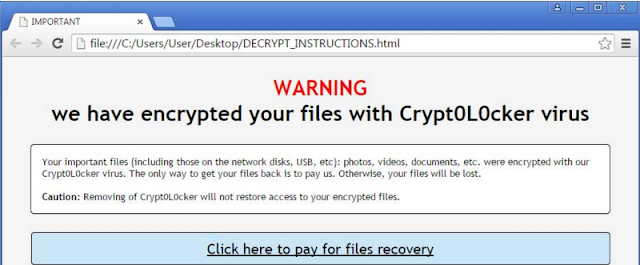
How to Remove Crypt0L0cker Ransomware & Restore Encrypted Files?

I think my computer is infected by a ransomware and it is called Crypt0L0cker. All my personal files seem to be locked by this virus. How do I remove this ransom virus and recover my files without paying the ransom?

What is Crypt0L0cker?


Crypt0L0cker is a file-encrypting ransomware that may encrypt your important files on your computer, networking disks, or USB by using RSA-2048 key (AES CBC 256-bit encryption algorithm). The files that have been encrypted are usually photos, video, documents, etc. Here are some examples:

.sql, .mp4, .7z, .rar, .m4a, .wma, .avi, .wmv, .mpqge, .kdb, .db0, .dba, .rofl, .hkx, .bar, .upk, .das, .pptm, .pptx, .ppt, .xlk, .xlsb, .xlsm, .xlsx, .xls, .wps, .docm, .docx, .doc, .odb, .odc, .odm, .odp, .ods, .odt...

Tuesday, May 12, 2015

How to Remove ‘Los Pollos Hermanos’ Crypto Virus? (Removal Guide)

What is ‘Los Pollos Hermanos’ Crypto?


‘Los Pollos Hermanos’ Crypto is a dangerous ransomware derived from the notorious CryptoLocker family. This ransomware is same to other Crypto viruses, such as Cryptowall, Cryptorbit, Critroni, or CTB Locker. Currently, the users from Australia and possibly other countries are the main victims of this Crypto Virus. According to researchers, Los Pollos Hermanos may access a PC in the form of fake updates for Java, Flash Player, and Adobe Reader.

Once this cyber threat enters your system, your files will be encrypted. Please note that this virus is capable of encrypting videos, pictures, documents and other files that are kept on the infected computer. As soon as it is installed on your computer, it starts asking to make a payment demanding $450 AUD in exchange for decrypting the encrypted files. However, if you fail to pay the ransom at the right time, it may increase the fee to $1000 AUD. You are recommended not to pay the fee because there is no guarantee that you can decrypt your files. What you pay for the decryption will be the income of the cyber criminals. So once you find your computer infected with ‘Los Pollos Hermanos’ Crypto, please look for more details about it.

Monday, May 4, 2015

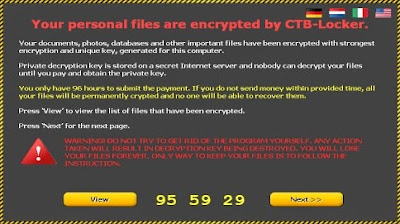
How to Remove CTB-Locker and Restore Encrypted Files? (Removal Guide)

Want to learn more knowledge about the aggressive CTB-Locker ransomware and use effective ways to get rid of this vicious ransomware? This post will offer what you want to know.

What is CTB-Locker?


CTB-Locker is a dangerous computer threat which is detected as a ransomware. You should stay away from this computer threat, because once this cyber threat enters your system, your files will be encrypted. Actually, CTB-Locker can block your access to the infected computers and force you to pay a sum of money for the decryption and recover your files.

Tuesday, April 14, 2015

How to Get Rid of KRIPTOVOR Ransomware (Removal Help)


Information about KRIPTOVOR


KRIPTOVOR is a dangerous encryption virus that belongs to ransomware. This virus often appears in Europe and the United States. Once infected, you will notice a bogus notification at your screen, stating:

“Your files have been safely encrypted on this PC: photos, videos, documents, etc. Click “Show encrypted files” Button to view a complete list of encrypted files and you can personally verify this.”

This ransom runs and generates a unique public RSA key and a private RSA key. It targets on various files like .xls, .doc, .pdf, .rtf, .psd, .dwg, .cdr, .cd, .mdb, .1cd, .dbf, .sqlite, .jpg, and .zip file extensions. It always demands a non-existing fine to restore or decrypt the locked files. You should never trust what is stated from the notification.

Channels for transmitting:

1)      Through Trojan horse infection;
2)      Attached to the spam email attachments;
3)      Embedded on misleading domains filled with commercial ads and pornographic content.

Thursday, April 9, 2015

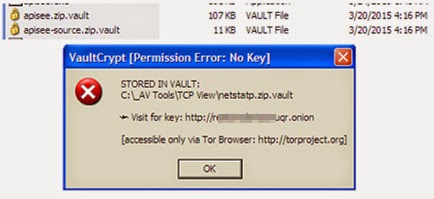
How to Remove CrypVault Ransomware from Windows?


What is CrypVault?


CrypVault is classified as a threatening windows infection which is something like CryptoWall 2.0, CryptoWall 3.0 and OphionLocker. There is no doubt that CrypVault is a malicious ransomware which takes control of an infected computer system and encrypts most personal files like txt, documents, and image files. If your computer has been infected with this ransomware, you cannot access these files anymore.


Generally, CrypVault ransomware pops up to victims in a form of a bogus notification on the monitor, trying to mislead users into believing that the machine is under locker and encryption due to impertinent activities. You are not recommended to pay the fine as there is no guarantee whether the encryption will be restored or not after the payments. CrypVault is very dangerous because it may not only destroy all the data on your system, but also perform malicious activities that will cause further damage. This ransomware is able to connect to the internet and download more infections on your PC. Besides, it will erase your files and create fake files to replace them.

How to Remove FBI MoneyPak from PC? (Removal Help)

-- I got a message on my Laptop saying it is blocked, until I pay 200 dollars in a moneypak, and put it on the state's account, then my computer will be unblocked in 1 to 48 hours. They claim I viewed copyrighted material, but I have no idea what they're talking about, cause I never did that! Is this just a scam or real?

What is FBI MoneyPak?


FBI MoneyPak is a kind of PC threat which is known as ransomware. It often displays alerts that keep asking you to send money to unlock your computer. Typically, you are not suggested to pay the money. This program is just created by cyber criminals to make profit by encrypting users’ files and all the shortcuts it manages to find.
FBI MoneyPak gets inside the system via trojan horses that come inside without users’ attention. Please note that this virus is capable of encrypting videos, pictures and other files that are kept on computer or other device. As soon as it is installed on your computer, it starts scan your data files and encrypt them so as to make cause them unusable.