Showing posts with label remove adware. Show all posts

Friday, October 16, 2015

How to Remove Searchres.2f5 from Your Computer Permanently?

I continually get a message from AVG that this virus in on my computer. Each time I ask that it be removed. Does anyone know why removal is not permanent? Thanks!

What is Searchres.2f5?


Searchres.2f5 is an adware that usually comes bundled with other software. Once installed, it will display a bunch of advertisements to your computer. There are also unwanted extensions and plugins added to your computer without permission. When you launch your computer and connect to the internet, you will notice random and constant pop-ups, redirects, or new tabs showing up. And then you will not be able to surf the internet smoothly. Besides, you will find your computer become sluggish by loading too many programs. Here are some symptoms after being infected.

Sunday, July 19, 2015

Three Steps to Remove Pop-up Ads “Brought by Shopping Deals”

If you are being frustrated by Shopping Deals, please see what it is and how to remove it below.

Shopping Deals is a nasty adware


Why do I say so? People who get infected may know the reasons. It can be annoying to see constant banners, pop-ups, or even in-text ads when you surf the internet. This adware can deliver you all these forms of adverts that might either labeled with “Ads by Shopping Deals” or “Brought by Shopping Deals”. Here is a screenshot of this adware.


Shopping Deals should be removed ASAP


Shopping Deals is detested and rejected by many computer users due to its troublesome behaviors. It can modify your browser settings and manage your browser extensions or add-ons. So you will soon notice that you have lost control on your web browser. The products or services it offers on your browser are not reliable. If you click any of the ads, you may be redirected to its sponsored websites that might be compromised by other malware. It can be excessively dangerous to your computer. You should get rid of as early as you can.

Friday, July 17, 2015

DealNoDeal Ads Pop up? – Help You Remove It

It might happen after you download and install something. When you see these ads - “DealNoDeal Ads”, “Ads by DealNoDeal”, or “By DealNoDeal”, you should know that you have got DealNoDeal in your computer as a certain program or browser extension. You can find it in your control panel or web browser.

Although this adware is thought to be potentially unwanted, it is actually rejected and detested by anyone who gets infected. That is because no matter what those ads offer, discounts or good deals, it will be a great obstacle for smooth online activities. Another thing is that when you click on the ads intentionally or unintentionally, you might be redirected to suspicious domain that holds malware. If so, you PC will be compromised severely.

DealNoDeal often comes alongside other programs as an optional download but usually get installed automatically without users’ permission. Once infected, you will find random pop-ups from this adware and you will find your PC becomes slower and slower. To get rid of this nasty adware you can use SpyHunter which is designed to assist the average computer user in protecting their PC from malicious threats.

Wednesday, July 15, 2015

Easy Way to Remove Ads by Cloud Scout from Firefox (IE/Chrome)

You download certain program and then infect with another adware called Cloud Scout?
You try to remove all the unwanted programs but still find pop-up ads?
If you need help to remove this adware, please see the removal guide below. Hope that you can get rid of all the threats successfully.

Description on Cloud Scout


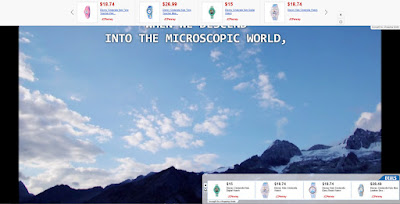
Cloud Scout is deemed as a potentially unwanted program or adware that usually sneaks into a computer stealthily. Once installed, this adware will deliver you various Ads by Cloud Scout on certain pages as top banners and side banners.

But that’s not all. This adware will display various advertisements that contain discounts, hot deals, product comparisons and reviews, coupons, or other interactive contents. All these contents will disturb your smooth online experience. Besides, this adware can not only mess up your internet browsing but also record your online habits confidential data. You should remove this problematic adware as soon as possible. Please mind that this adware usually gets installed on a computer alongside with freeware downloads. You should pay close attention to what you download either from any suspicious resource or from any anonymous website.

Monday, July 13, 2015

Fast Ways to Remove Ads by Coupon – How to Remove?

If your web browser has been affected by random Ads by Coupon, please don’t worry. This post will tell you how to remove them quickly and completely.

Description on Coupon


Coupon is an adware that claims to help its users save time and money in online shopping. It seems great but the fact disappoints you. Once inside, it can trigger different kinds of advertisements labeled with “Ads by Coupon”, such as discount coupons, deals and online savings, but none of them can improve your online experience. Those ads will just disturb your online activities. Besides, this adware can monitor your internet browsing activities and record IP addresses, unique identifier numbers, search queries, website URLs visited, pages viewed, and other details that may be personally identifiable. There are many other bad things it will do. You have no idea what threat it will bring to your computer. You should stay away from it or just remove it when it appears.

Coupon breaks into vulnerable PC stealthily without any notification because it often comes bundled with other free software. If you ignore the additional downloads that has bundled to the software you want, you will get it in your PC. To protect your PC from suspicious and even malicious programs, you should always mind your online activities.

Friday, July 10, 2015

Three Effective Method to Remove Ads by PCoupoon

Once you see multiple “Ads by PCoupoon” when browsing, you should try your best to remove it. Otherwise, you will get into trouble. If you want to remove this program easily, please try the method below.

About PCoupoon


PCoupoon is advertised as a useful tool to provide its users with convenience in online shopping. So, why do many people want to remove it? If you get this adware in your PC, you will soon find the reason. What it does is totally opposite what it claims. Added as a browser extension on every web browser, it can deliver multiple pop-ups, banners, or in-texts to its users regardless of their desire.

Usually, various coupons, discounts, deals and other commercials will inject onto the website you visit. Those contains are lack in reliance and can mess up your online activities. Please keep in mind that this adware can damage your internet browsers by managing your web browsers extensions and collect your important data and information for unknown purposes.

Easy Ways to Remove Ads by DiscountRatio from Firefox

When you surf the internet, you find a lot of random ads? They all come from a program named DiscountRatio? If you do find it disturbing and want to get rid of it easily, please read the following guides carefully.

DiscountRatio is a Nasty Adware


DiscountRatio displays various pop-ups with different contents such as linked products, coupons, and discount deals because it tells its users it will enhance their internet experience. Actually, what do you get from this program? It is trouble, trouble, trouble! You must know that this adware is created to generate web traffics and make pay-per-click revenues. It will only bring you different kinds of nasty and unwanted ads.

DiscountRatio Should Be Removed from Your Web Browser


Why is DiscountRatio unwanted? That is because it not only triggers a lot of commercial or noncommercial ads from third parties but also bring in additional questionable content like web browser toolbars, optimization utilities and other unwanted programs. What’s worse, this adware will change existing Windows start-up settings to enable malicious activities in your PC. You should remove it from your web browser and even computer.

Thursday, July 9, 2015

Smart Tips on Removing GrouperConcept Ads

Learn GrouperConcept before Removing


GrouperConcept is promoted as a useful shopping helper but actually categorized as a disturbing adware that displays unstoppable pop-ups on the infected browser. It claims to offer the best deals on the website that its users visit. However, all those products, coupons, discount deals, and positive saving are totally unwanted and unauthentic. What you should do is find out the adware and remove it.

Created to generate web traffics and make pay-per-click revenues, this adware can not only settle in your computer but also add itself as a browser extension to your default web browser. Once infected, you will notice “Ads by GrouperConcept” appear in different forms like pop-ups, banners, or underlined ads. It will trigger unwanted programs to your PC if you click the ads that offer media update or PC scanner. What’s worse, this adware is able to cause serious privacy issues and lead to high-risk malware infections. You should treat it with caution.

Easy Steps on Removing CycloneCover from Any Web Browser

If you feel annoyed with CycloneCover which displays various ads on your browser, you can remove it to get back your smooth browsing. If you try to get rid of it but fail, you can follow the removal guides below. Wish you good luck.

CycloneCover Can Disturb Your Online Activities


CycloneCover claims to help users enhance their shopping experience by providing them with information regarding the best deals and bargains on the web. However, it never keeps its promise. It is just another nasty adware which distributes various pop-up ads on the website that you visit.

This adware can be installed onto your web browser with the help of other free programs or attachments. It may possibly load by default when you download any infected programs. Once inside, it will interfere with your browsing via pop-ups or underlined keywords titled with “Ads by CycloneCover”, “Brought by CycloneCover” or “Powered by CycloneCover”. Please mind this adware because it can drive up CPU overhead and create unnecessary workload. And then your computer will become slower and slower.

Teach You How to Remove Alpha Shopper Ads

When you find ads constantly appear on your browser, you may want to remove it. And when you take actions, you may sometimes find it still there because everything you do cannot help. If you notice that Alpha Shopper acts like what is mentioned, you can follow the removal guide below and remove it.

Alpha Shopper is Potentially Unwanted


Alpha Shopper is obviously an adware because it pulls all kinds of commercial or noncommercial ads on the website that you visit. It is advertised as a shopping buddy that offers best deals or discounts to the products you are looking for. Added as a browser plug-in/extension, this adware can load product compare ads, place in-text ads and show banners and pop-up windows to deliver promotions. It is not a piece of good news when you find them totally unwanted and nasty.

Once you see ads labeled with “Ads by Alpha Shopper” or “Alpha Shopper Ads” on the website that you visit, you should raise your attention because it will bring you various troubles. When you click some ads that hold malware, if possible, your browser or even your system will be compromised. If not, you will also find your browser setting changed and your information stored on browser will be read and collected.

Tuesday, May 26, 2015

How to Remove MasterDeals Adware from PC?

What is MasterDeals?

MasterDeals is an ads-supported program that claims to enhance users’ browsing experience by showing comparison shopping, coupons, and other features. Actually, it is just a nasty adware which distributes various pop-up ads or underlined keywords with an intention of gaining profit. This adware often comes with the purpose to alluring uses’ visits and using its sponsored products and services. It can break into your PC alongside other programs or software that you install consciously or unconsciously.

Please mind that browsers may be messed up by all kinds of ads, deals, sponsored links and also free malware scan promotion. Once added, this adware will generate web rubbishes to block your normal online activities. Besides, it is able to compromise your system with unknown malware and even dangerous trojans. Advertisements with “MasterDeals Ads” or “Ads by MasterDeals” on your browser (i.e. Mozilla Firefox, Google Chrome, and Internet Explorer) may be a signal that your PC is infected.

How to Remove OptiDiscount? (Removal Guide)

What is OptiDiscount?


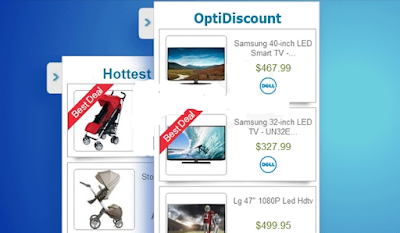
OptiDiscount works as an ads-supported extension on many web browsers. It claims to provide its users with a great range of limited-time offers, interesting deals, social media apps, coupons, comparison shopping, and many more. OptiDiscount seems to have an extremely high degree of flexibility for shoppers, but actually, it is listed as an unwanted or even nasty adware that is rejected by its users. Seemingly, it is good for those who would like to hang out online shops and seek for something interesting and discounting. However, please do not get fooled by these promises as they are nothing more than a hoax.


OptiDiscount can affect many web browsers including Mozilla Firefox, Google Chrome, and Internet Explorer. It can mess up your browser by adding other unwanted extensions in the background which enables constant ads when your launch your browser. Except for the interruptions from the banners, pop-ups, or in-texts, you may face with information and privacy theft because OptiDiscount may read and record your data stored on the computer. Besides, the existence of this adware will eventually slow down your webpage loading as well.

Sunday, May 24, 2015

How to Remove Find-a-deal? Best Way to Get Rid of Ads by Find-a-deal


What is Find-a-deal?


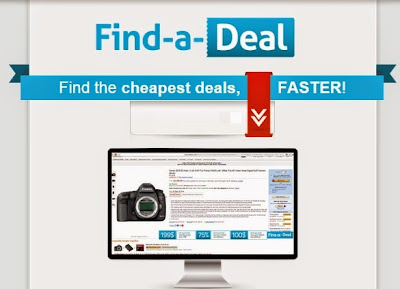
Find-a-deal is an adware program that works as extension in the Chrome and Firefox or BHO in the IE. This adware usually appears on your visiting websites, especially eBay, Amazon, and Walmart. It is promoted as a useful tool that helps its users find the cheapest deals faster via showing available compared deals and discount offers as underlined advertisements with “Ads by Find-a-deal”, “Find-a-deal Ads”, “Find-a-deal Deals”, “Powered by Find-a-deal”, “Brought to you by Find-a-deal”, etc.


How to Remove DealMine Adware & Ads by DealMine?

DealMine keeps showing banners, pop-ups, pop-unders, or in-texts when you browsing the web? Those ads have interrupted your online activities? If you remove this kind of adware with no luck, you are welcomed to try the methods offered in the following page. Hope they will help you out of troubles.

What is DealMine?


DealMine is a useless application which falls in to adware category. It promises to offer you great deals with discounts and price comparisons. However, this adware never keeps its promise. This adware does offer you seemingly favorable deals, but all those deals are shown as all kinds of forms such as pop-ups or underlined keywords. The deals can be random or even full-paged. You will never be happy when your webpage is completely covered by them.

Easy Ways to Remove Ads by MarketCompare (Pop-ups or Underlined Keywords)

Ads by MarketCompare appear on the webpage that you visit? Get tired of those cross-browser or full-page ads? Need more knowledge about this kind of adware? Want to get rid of the adware hidden in the background? If so, please look through this post for more details.

Description on MarketCompare


MarketCompare is a free application which can enable different kinds of ads on every webpage you visit. It is promoted as a useful tool that offers you help in saving your time and money by showing various discounts, favorable deals, or other seemingly positive offers. It sounds like a must-have application. However, MarketCompare is just another nasty adware that aims at making money through promoting its sponsored products or services. It can display full page of ads, deals, coupons, or other services as banner, pop-up, pop-under, interstitial, transitional, or in-text. Bad news is that almost all the ads from this adware are thought to be unreliable or even fraudulent.

How to Remove RockApps from IE/FF/Chrome?

Are you annoyed with the ads from RockApps? Have you tried to remove them but fail? If you are seeking solutions for this adware, you can read the post below.

What is RockApps?


RockApps is categorized as nasty adware that provides pop-ups and text links. It is described as a useful tool that will save its users’ time and money and enhance their online experience by offering efficient coupon, discount, deal information and many others. However, it is never as good as it claims. It just messes up your web browser by showing random ads on any of your web browsers including Mozilla Firefox, Google Chrome, Internet Explorer and even Safari. Once infected, you will get pop-ups when you browse Amazon.com, Walmart.com or BestBuy.com.

Thursday, May 21, 2015

How to Get Rid of BloCKUTubeAd Easily? (Removal Guide)

What is BloCKUTubeAd?


BloCKUTubeAd is classified as a potentially unwanted adware due to its suspected features that show on the computers added with this program. Please don’t trust this adware even if it usually disguises itself as a useful application and promises to help its users block annoying ads whenever they watch videos in YouTube.

Working as a BHO (Browser Helper Object)/add-on/browser extension, BloCKUTubeAd is compatible with most common web browsers such as Internet Explorer, Firefox and Google Chrome. Once infected, you may see many linked products, coupons, and discount deals on various websites in the form of banners, popups, and pop-unders. Those ads sometimes will show as titled advertisements like “BloCKUTubeAd Ads”, “Ads by BloCKUTubeAd”, Brought by BloCKUTubeAd”, or “Powered by BloCKUTubeAd”. This adware can install itself on your computer without your knowledge and then start making troubles. For example, it can:

How to Remove CoupoonService64?

Your computer is infected with CoupoonService64? Want to get rid of this kind of adware? This post is specially created to tell you how to remove CoupoonService64 and fix the similar programs. You are welcomed to read it for help.

What is CoupoonService64?

CoupoonService64 is a tricky and pesky adware which break into vulnerable PC stealthily without any notification. This adware is just a trouble for both your browser and PC. Why? Reasons can be various.

Firstly, once inside, this adware can trigger different kinds of advertisements, such as discount coupons, deals and online savings, but none of them can improve your online experience. Those ads will disturb your online activities. And if you click on them, you will be redirected to suspicious domains with malware infections. Secondly, this adware can monitor your internet browsing activities and record IP addresses, unique identifier numbers, search queries, website URLs visited, pages viewed, and other details that may be personally identifiable. It is dangerous for your privacy. Last but no least, it can also degrade PC performance and add malcodes to Windows registry.

Wednesday, May 20, 2015

Effective Guide to Remove SurpriseSavings Ads

Information about SurpriseSavings


SurpriseSavings is classified as an unwanted adware due to its distribution in illegal way. This adware usually sneaks into the vulnerable browsers without any notice and permission because it often comes bundled with other freeware or shareware. When you download and install the infected applications, SurpriseSavings will be downloaded alongside. You have no idea about its existence until you find its commercial ads or other on your browser. All these ads are often in the forms of underline, in-text, banner or contextual.

SurpriseSavings can damages your internet browsers in various aspects resulting from its notorious web browser extension. This adware can make several modifications on your browser so that you can’t operate it as usual. It may read your stored browsing data and information. It can also collect these data and information and send them to the cyber criminals for other commercial purposes. In a word, you can find no good from this program.

Effective Guides to Remove Ads by Ext Coupons from Firefox/ IE/Chrome

Description on Ext Coupons

Ext Coupons is deemed as an adware program which claims to enhance users’ online browsing experience. However, please don’t trust what it says because it is only designed for marketing purpose. It may offer you extra tools which may work behind your eyes. As a result, you may get various commercial ads or other sponsored services from unreliable online retailers.

As a browser extension/add-on, Ext Coupons is often found in different browsers including Internet Explorer, Google Chrome and Mozilla Firefox. If you have got this adware on your browser, your internet browsing may be interrupted by the cross-browser advertisements claiming from Ext Coupons. If you click those ads, you may get no help to save your money. Instead, you will be certainly redirected to untrusted web sites where your cyber security may be at risk. It can also invite you to install supposedly legitimate updates to Java or other programs that promise to speed up your PC. Constant barrage of ads, offers, and pop-ups claiming from this adware can mess up your online activities. And you confidential information other private data may be at risk if you keep this adware in your PC.