Showing posts with label erase adware. Show all posts

Wednesday, June 10, 2015

How to Remove Installies.in Pop-up Completely?

Installies.in occurs when you launch your browser? It kept reappearing and you failed to remove it? Need help remove it urgently? Please read this post and learn how to get rid of this pop-up.

What is Installies.in?


Installies.in is a fake virus alert caused by potentially unwanted program or adware which can affect many browsers like including Mozilla Firefox, Google Chrome, and Internet Explorer. It often shows as a pop-up new tab page stating, “You might be infected with adware/spyware virus.” However, this popup is not trustworthy at all. It is just used to spread scams and trick you in calling its hotline 1(844)373-0538 for the so-called fast assistance.

Is Installies.in Pop-up Safe for PC?


Installies.in can never be safe for both your browser and PC. It can perform a lot of vicious activities. Here are some PC issues caused by it listed below:

  • It can modify your browser settings and trigger numerous dangerous issues;
  • It can add harmful files to major part of the system;
  • It can trigger additional programs in your control panel;
  • It can cause interruptions on your internet browsing;
  • It can collect your browser records and steal your privacy.

Tuesday, June 9, 2015

How to Remove Daddy Browser Champion Easily? (Adware Removal Guide)

What is Daddy Browser Champion?


Daddy Browser Champion is an adware-driven program which claims to improve its users’ web-surfing experience in some way. Actually, it is designed to lure unsuspecting users into downloading and installing its sponsored products with hoax advertising. It is often designed to promote the sponsored commercial websites. As is seen, this adware takes over website with the advertisements titled with “Powered by Daddy Browser Champion Assistant”, “Brought to you by Daddy Browser Champion”, or “Ads by Daddy Browser Champion”. Please treat it with cautions because it may cause a lot of troubles.

How Does Daddy Browser Champion Affect You?


Working as a browser extension on Google Chrome, Internet Explorer, or Firefox, Daddy Browser Champion will display dubious coupons, advertisements and sponsored links on the website that you are visiting. Once infected, this adware may display pop-up ads to disturb you by covering some of the information you want to know in the website. Besides, this adware can generate cookies to record your browsing activities. If so, there will be no guarantee that your privacy is still safe. More severely, this adware may cause other potential problems like performance degradation, application malfunction, and system slowdown. You should not belittle it.

Thursday, May 21, 2015

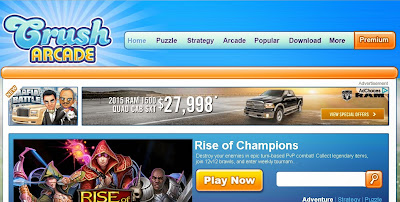
How to Remove CrushArcade Ads


What is CrushArcade Ads?


CrushArcade is a suspected application that may generate pop-up ads or new tab to the infected browser. It is sometimes promoted as an exciting gaming portal that offers thousands of free games. It does match with what it claims but it is more nasty than enjoyable. This program has a wide range influence on the worldwide internet. Suspicious ads caused by CrushArcade can mess up the infected PCs and new toolbars or search pages which will also divert search or simply uses search queries to generate ads that might be interesting to the users will be installed. Besides, as it claims, you may get gaming platforms on your computer. However, other nasty things followed by CrushArcade may be random pop-ups or unwanted redirects. Therefore, it is obvious that victims’ online activities will be seriously interrupted.


Monday, May 11, 2015

How to Stop Ads by ShopSmart – Remove ShopSmart Completely

What is ShopSmart?


ShopSmart is an online advertising platform which claims to be a useful tool to save users’ money and time by showing users all kinds of deals, bargains, and various coupons. However, this adware will soon upset you in various aspects.

When you get ShopSmart in your browser, you find no convenience in saving your money and time. Instead, the distributor of this adware will make money from you and the ads claiming from this adware may display randomly at your webpage to interrupt your online activities. Please mind the advertisements titled with “Powered by ShopSmart”, “Ads by ShopSmart” or “Brought by ShopSmart”. It is a sign that you have infected with an adware.

Wednesday, May 6, 2015

CrossBrowse-2.1v Removal Guide – Best Ways to Get Rid of “Ads by CrossBrowse-2.1v”

AboutCrossBrowse-2.1v


CrossBrowse-2.1v is classified as an adware infection which is used to make easy money from promoting its sponsored products. This adware often breaks into users’ computer without their consent and knowledge. Once it enters the target computer, it starts generating something unwanted and nasty in the form of banner, interstitial, in-text, search, transitional, or full-page ads at your screen. Just like other commercial adware, CrossBrowse-2.1v may appear as “Powered by CrossBrowse-2.1v”, “Brought t byCrossBrowse-2.1v”, or “Ads by CrossBrowse-2.1v”. These ads are signs of being infected with an adware in the computer.

CrossBrowse-2.1v can be added to almost all the popular web browsers including Google Chrome, Mozilla Firefox, and Internet Explorer. It is offensive because it can damages your internet browsers resulting from notorious web browsers extensions. This adware can make several modifications on your browser so that you can’t operate it as usual. On the other hand, CrossBrowse-2.1v may read your stored browsing data and information. It can also collect these data and information and send them to the cyber criminals for other commercial purposes.

Tuesday, April 28, 2015

How to Remove Ads by OpenBrowserVersion?

OpenBrowserVersion started coming to every page you visit? All your efforts on removing this nasty program cannot help? Please go through this post and get effective removal instructions.

What is OpenBrowserVersion?


OpenBrowserVersion is a nasty adware designed to earn money through displaying various commercial ads. Although it claims to help you save time and money on your online shopping, you will soon find it unauthentic. This program can be easily downloaded and installed on your computer without your consent and knowledge through bundling to some software.

Get Rid of Ads by DollarSaver Easily

If you have got Ads by DollarSaver on your computer and need help remove them, please come to this post and get effective solutions.

Description on DollarSaver


DollarSaver is an adware which aims at helping users save money. As is seen, this adwre may display various pop-ups with different contents such as linked products, coupons, and discount deals. It can access the target hosts stealthily by installing itself on Google chrome, Internet Explorer, Firefox as a browser extension or add-on.

DollarSaver causes many troubles while you are surfing the internet. Once infected, you will notice various pop-up ads labeled with “Ads by DollarSaver” or “Powered by DollarSaver” across the browser. This adware will trigger other ad-supported or suspicious browser extensions. You will get irritated with the interruptions from them. What’s worse, this adware is able to cause serious privacy issues and lead to high-risk malware infections.

Best Tips to Remove Ads by SeaLeiPiluis

About SeaLeiPiluis


SeaLeiPiluis is an adware program which will display pop-up ads and other advertisements on any of the infected browser. The displaying advertisements are often boxes or advertising banners containing various coupons, deals, product comparisons and free offers. These ads will always appear with a tag hanging with “Ads by SeaLeiPiluis” or “Powered by SeaLeiPiluis”.

As one of the ad-delivering applications, SeaLeiPiluis can be installed onto the web browser just as what any other browser extensions did. You have no idea about its existence until it shows its underlined key words and popups. Commonly, when you download any other infected programs, this adware will load by default.

Wednesday, April 22, 2015

How Can I Get Rid of Boby Zoom? (Ads by Boby Zoom Removal Guide)

What is Boby Zoom?

Boby Zoom is classified as a potentially unwanted adware. It claims to help kids zoom any pictures when go online. However, it will generate a great many of advertisements. These numerous advertisements are often labeled with slogans like “Boby Zoom”, “Ads by Boby Zoom” or “Brought to you by Boby Zoom”. When you find these ads on your browser (Mozilla Firefox, Google Chrome, Internet Explorer and even Safari), it is sure that you get this adware extension on your browser background.

Other features of Boby Zoom:

1.       Show numerous additional deals, offers, video, product comparisons and reviews, coupons;
2.       Appear in the form of banner, pop-up, pop-under, or in-text link advertisements.